CLAUDE.md and AGENTS.md: giving your AI agent a memory
Your agent forgets everything between conversations. CLAUDE.md and AGENTS.md fix that. Here's what works everywhere, and what Claude Code adds on top.
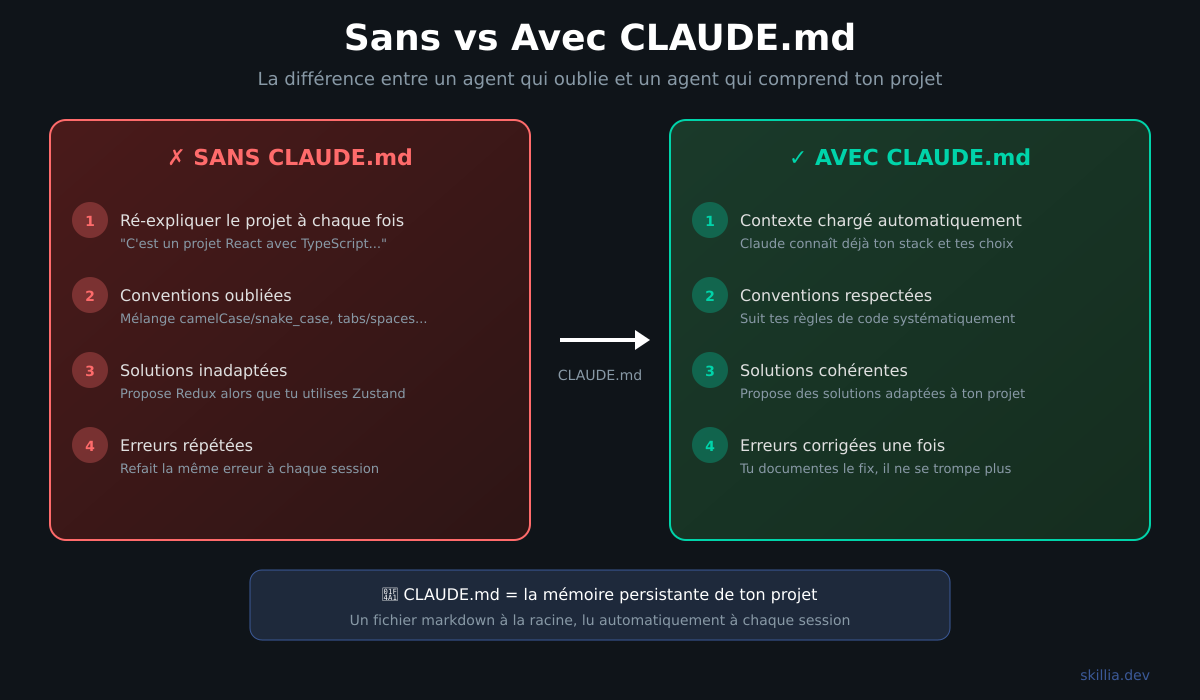
Ever felt like your AI agent forgets everything between conversations?
That's normal. LLMs don't have persistent memory. Every conversation, you have to re-explain who you are, your project, your conventions. It's like onboarding a new dev every time.
The solution? A markdown file at the root of your project that gives context to your agent. Automatically. Every session.
And it's not just a best practice. Vercel measured it: a simple AGENTS.md file achieves 100% success rate on their Next.js 16 evals, compared to 53% without context and 79% with a more complex skills system. A text file beats a sophisticated retrieval system. Why? Because the info is always there, no need to decide when to load it.
Two standards, same idea
There are two formats for this.
AGENTS.md is an open standard backed by the Linux Foundation. It works with over 20 tools: OpenAI Codex, Google Gemini CLI, Cursor, Windsurf, OpenCode, Aider, GitHub Copilot, Devin, and more. It's the universal format.
CLAUDE.md is the format specific to Claude Code. Same basic concept, but with advanced features on top (targeted rules, hooks, skills, memory hierarchy).
The Anthropic engineering team doesn't mince words:
"CLAUDE.md is the single most important file in your codebase for using Claude Code effectively."
If you use multiple tools (Claude Code + OpenCode for example), you can have both files. Or create a symlink:
ln -s AGENTS.md CLAUDE.md
The base content is the same. It's the advanced features that differ.
A concrete example
Here's what a simple but effective context file looks like. This content works in both formats:
# Bash commands
- npm run build: Build the project
- npm run typecheck: Run the typechecker
- npm test: Run tests

# Code style
- Use ES modules (import/export) syntax
- Destructure imports when possible
- Prefer const over let

# Testing
- Run tests before committing
- All new features need tests
- Mock external APIs in tests
Simple. Clear. Effective. In 15 lines, the agent knows how to build, test, and code on your project. Whether you're using Claude Code, OpenCode, Cursor, or Codex.
The 3 golden rules
These rules apply regardless of the tool.
Rule #1: Less is more
According to HumanLayer:
"Keep your file to fewer than 300 lines; aim for less than 60 lines."
Why? LLMs can reliably follow around 150 to 200 instructions. Your agent's system prompt already consumes some of that. If your file is 500 lines long, a good chunk will be ignored.
Keep your file lean. Get to the point. If a rule isn't critical, it doesn't belong in the main file.
Rule #2: Every mistake becomes a rule
The Anthropic team uses this method:
"Anytime we see Claude do something incorrectly we add it to the CLAUDE.md, so Claude knows not to do it next time."
This works with any agent. Your agent pushes to main without asking? Add "NEVER push to main without explicit approval". It uses the wrong package manager? Add "Use pnpm, not npm".
Your context file evolves over time. It's a living document.
Rule #3: Give alternatives, not just restrictions
Bad:
Never use the --force flag
Good:
Never use --force. Use --force-with-lease instead.
Why? Because if you just say "don't do X", the agent will get stuck when it thinks it needs to use X. Always give an alternative.
Organizing for large projects
When your project grows, a single file isn't enough. Both standards support files in subdirectories.
monorepo/
├── AGENTS.md              # Global instructions
├── packages/
│   ├── api/
│   │   └── AGENTS.md      # API-specific instructions
│   └── frontend/
│       └── AGENTS.md      # Frontend-specific instructions
The file closest to the edited file takes priority. Your API rules don't pollute the context when you're working on the frontend.
OpenAI uses over 88 AGENTS.md files in their main repo. It's a standard practice for large projects.
What Claude Code adds
Everything above works everywhere. What follows is specific to Claude Code.
Rules with path targeting
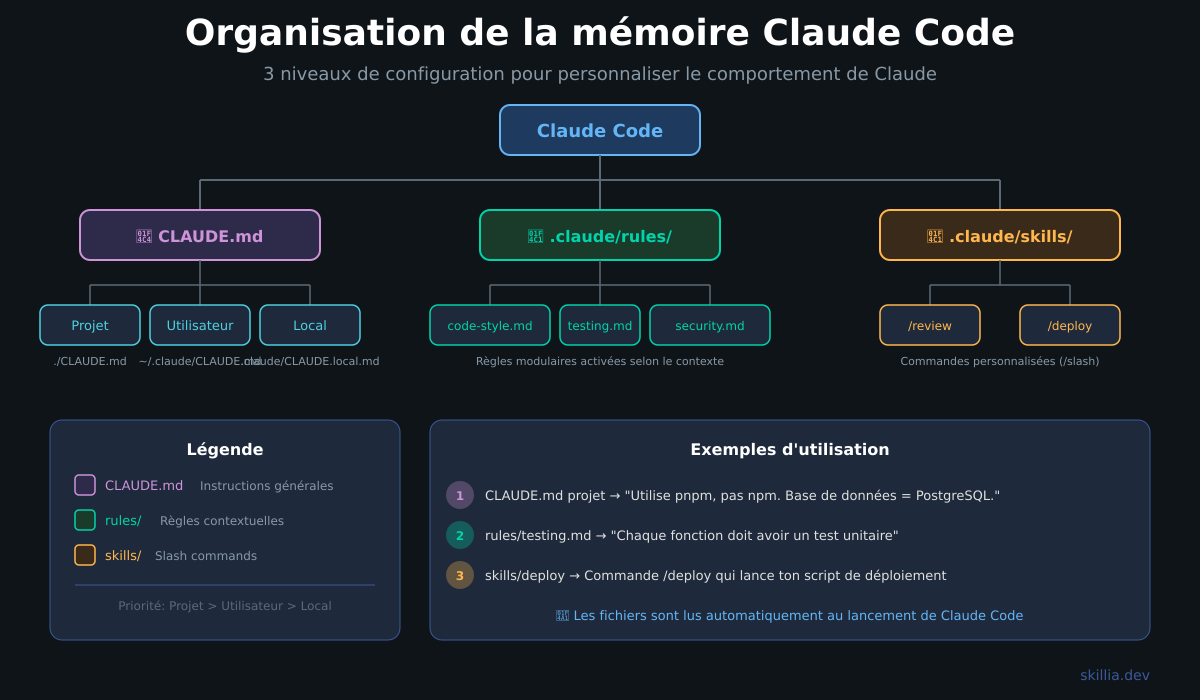
Claude Code offers a rules system via the .claude/rules/ folder:
.claude/
├── CLAUDE.md           # Main instructions (keep it concise)
└── rules/
    ├── code-style.md   # Code conventions
    ├── testing.md       # How to test
    └── security.md     # Security rules
The most powerful feature: path targeting.
---
paths: src/api/**/*.ts
---
# API Rules
- Validate all inputs with Zod
- Return consistent errors
With this paths YAML frontmatter, these rules only activate when Claude edits files in src/api/. Your API rules don't consume tokens when you're working on React.
Imports with the @ syntax
No need to copy everything into your CLAUDE.md. The @ syntax lets you import any file:
# My Project

See @README.md for the overview.
Git conventions: @docs/git-workflow.md
Architecture: @docs/architecture.md
Claude Code automatically loads the referenced files. You can see everything that's loaded with /memory.
Memory hierarchy (8 levels)
CLAUDE.md isn't alone. Claude Code loads multiple memory levels, from most global to most local:
1. Managed policy    -> /etc/claude-code/CLAUDE.md (admin, for the whole org)
2. User memory       -> ~/.claude/CLAUDE.md (you, all your projects)
3. User rules        -> ~/.claude/rules/*.md (you, all your projects)
4. Project memory    -> ./CLAUDE.md (team, via git)
5. Project rules     -> ./.claude/rules/*.md (team, via git)
6. Local memory      -> ./CLAUDE.local.md (you, this project)
7. Sub-directory     -> ./src/api/CLAUDE.md (context activated on demand)
8. Auto memory       -> ~/.claude/projects/<project>/memory/ (auto notes)
The most specific one wins. If your project CLAUDE.md says "use tabs" and your user CLAUDE.md says "use spaces", tabs win when you're working on that project.
Hooks
Hooks are code that runs automatically when Claude performs certain actions. Configured in .claude/settings.json.
The most useful example: auto-formatting after every edit.
{
  "hooks": {
    "PostToolUse": [
      {
        "matcher": "Edit|Write",
        "hooks": [
          {
            "type": "command",
            "command": "npx prettier --write \"$FILE_PATH\""
          }
        ]
      }
    ]
  }
}
Every time Claude modifies a file, Prettier formats it. Without any intervention on your part. Hooks cover 14 different events (session start, before/after each tool, compaction...). The official hooks documentation covers everything.
Skills
Skills turn repetitive tasks into commands. Create .claude/skills/review/SKILL.md:
---
name: review
description: Code review of a file or PR
---

Do a code review of the provided code following our conventions:
1. Check business logic
2. Check error handling
3. Check TypeScript types
4. Suggest improvements
Type /review and Claude does the review with your criteria. No need to re-explain everything each time.
Summary: what works where
- Markdown file at the root: AGENTS.md: Yes, CLAUDE.md: Yes
- Subdirectories (monorepo): AGENTS.md: Yes, CLAUDE.md: Yes
- Build/test/lint commands: AGENTS.md: Yes, CLAUDE.md: Yes
- Code conventions: AGENTS.md: Yes, CLAUDE.md: Yes
- Closest file takes priority: AGENTS.md: Yes, CLAUDE.md: Yes
- Rules with path targeting: AGENTS.md: No, CLAUDE.md: Yes
- Imports (
@file): AGENTS.md: No, CLAUDE.md: Yes - Memory hierarchy (8 levels): AGENTS.md: No, CLAUDE.md: Yes
- Hooks (14 events): AGENTS.md: No, CLAUDE.md: Yes
- Skills (custom commands): AGENTS.md: No, CLAUDE.md: Yes
- Auto memory: AGENTS.md: No, CLAUDE.md: Yes
- Compatible tools: AGENTS.md: 20+, CLAUDE.md: Claude Code
Start simple
- Create an
AGENTS.mdfile at the root of your project (compatible with everything) - If you use Claude Code, also create a
CLAUDE.md(or a symlink) - Add your basic commands (build, test, lint)
- Add your main code conventions
- Every time your agent makes a mistake, add a rule
- If you're on Claude Code and it grows, split into
.claude/rules/
The difference between an agent that wastes your time and an agent that makes you productive? Often, it's just this file.
Sources:
- Anthropic Engineering: Claude Code Best Practices
- AGENTS.md: Open Standard (Linux Foundation)
- Vercel: AGENTS.md outperforms skills in our agent evals
- OpenAI: Custom instructions with AGENTS.md
- Claude Code Documentation: Memory
- Claude Code Documentation: Hooks
- Claude Code Documentation: Skills
- HumanLayer: Writing a good CLAUDE.md